Every Last Thing app icon

// a tag on everything worth writing down

With testers · iPhone

Every model number, size and color in your house.

The filter your furnace takes. The serial number on the back of the dryer. The paint in the hall. You need each of them about once a year, from somewhere inconvenient, and that is exactly when nobody can find them.

Three moments it is for.

  • 🛒The aisleYou are standing in front of the filters and you have no idea which one. Search your own house and the size is there.16 × 25 × 1
  • 🔎The floor behind the dryerPoint the camera at the plate. It reads the model and serial off it, and offers them to you to tap.DLEX4000B
  • 🧾The claimSomething floods or burns and an adjuster wants a list. Make the inventory as a PDF and send it.47 items, 3 rooms

A card for every thing, in the room it lives in.

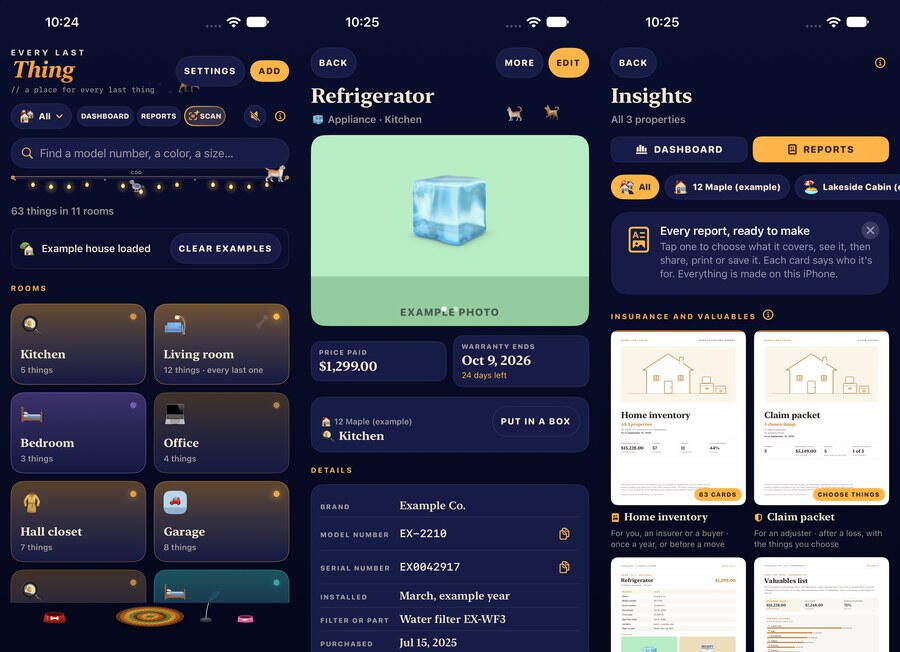
Make a room, put things in it, and photograph them. The card holds what you will want later and nothing you have to invent.

  • model & serial
  • photos
  • the manual
  • the receipt
  • warranty end
  • filter & bulb sizes
  • paint color
  • what it cost
  • where you bought it
  • the barcode
  • tap-to-copy tags

Tap a size or a serial to copy it, because the next thing you do with it is paste it into a shop's search box.

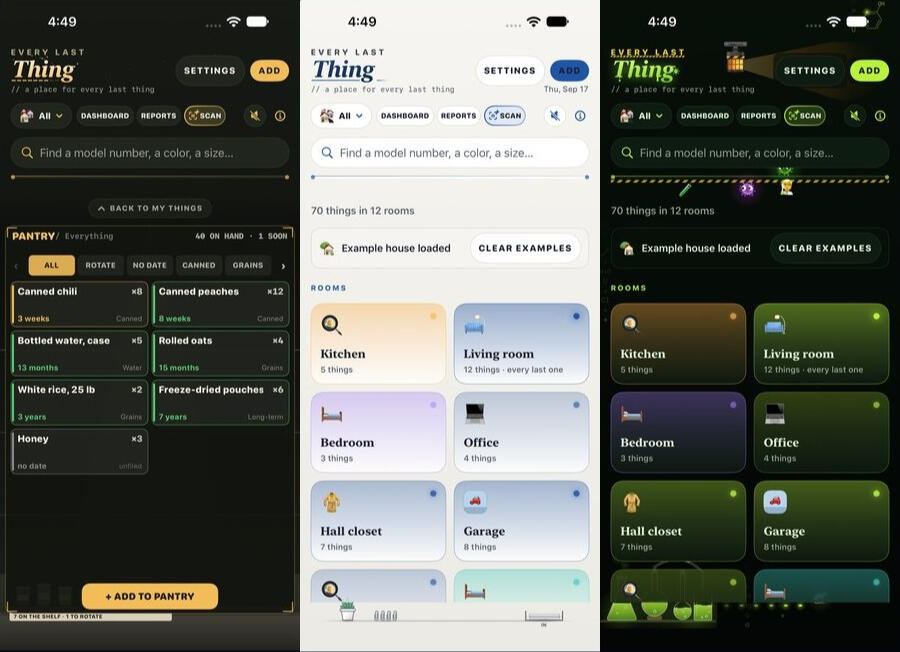
Real screens, from the build the testers have.

The camera does the reading.

Appliance plates, furnace-filter frames, paint labels, VINs and barcodes. The reading happens on your iPhone, and every number it finds is offered as a suggestion you tap — never something it fills in and hopes you don't notice. It gets things wrong; that is why you get the last word.

The list an insurer asks for.
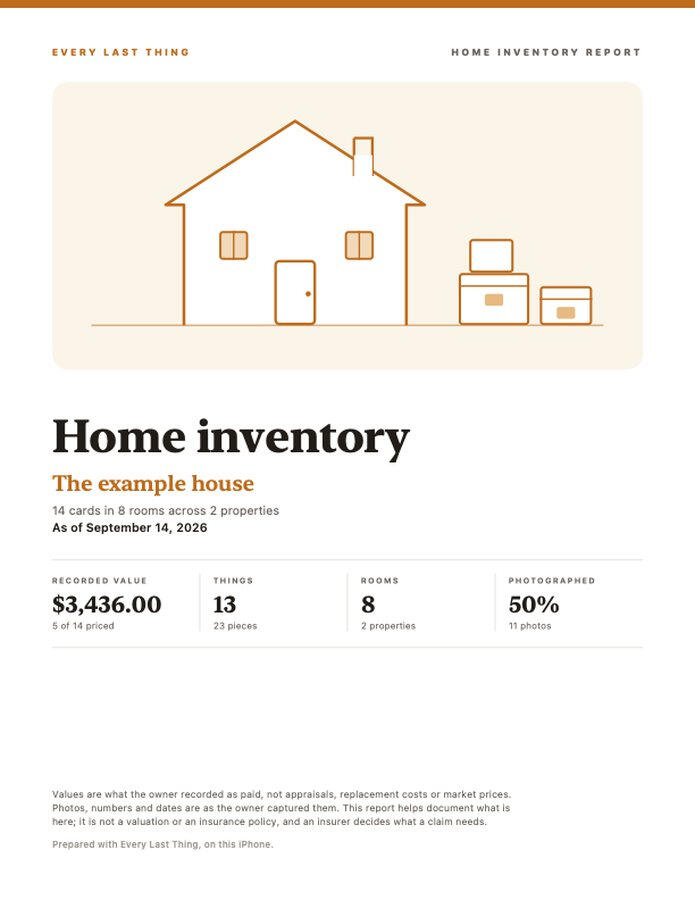
The first page of a home inventory report: a property heading, then rooms with their items, values and photographs.

One tap makes a home inventory PDF, room by room, with the photographs and what each thing cost. Send it to an adjuster, a landlord or a solicitor. It opens anywhere, and it does not need this app — or us — to read it.

A page of the report, from the example house the app ships with — not anybody's real one.

Your house stays on your iPhone.

The records live on your phone and sync to your own iCloud, which means your own other devices and nowhere else. There is no account here, and nothing you write down arrives on our server — there is no server in this app. Four things do go out, all of them only when you ask:

WhenWhat leaves your phoneWho answers
You set a property's location, or ask for shops nearbyThe coordinate, or what you type into the search boxApple Maps
You turn on weather in the houseThat property's coordinate, at most once every 45 minutesApple Weather
You look up a record or CD, or hold ListenThe barcode or the words you typed; for Listen, a short sound signature made on the phone — no recordingApple Music, Shazam
You turn on Look things up online, which is off until you doThe barcode's digits, and nothing else. An answer is remembered, so the same tin is asked about onceOpen Library, Open Food Facts

What none of that is for: it does not feed a profile, it is not how this app makes money, and it is the only part of the app that talks to anybody. There are no analytics, no advertising identifiers, and nobody pays to be in here.

Yours to take with you.

  • Export everything, any time. A folder of open files with your photographs in it, readable without this app and without us.
  • No account and no login. Nothing to sign up for, nothing to be locked out of.
  • We never sell personal data. Not aggregated, not anonymized, not to a broker.
  • Nothing you have paid for ever moves behind a new price.
Paid once, for the app.Every property, room and card you want to make; the scanning; the search; reminders; the report; the export; and every fix and improvement after it.
  • The Holiday Pack is a one-time purchase: nine holidays that dress the house up on their day. The six everyday rooms are part of the app and stay that way. Apple shows you the price before you buy, and it restores on a new phone without an account.
  • A yearly service is designed and not built — the things that would need a server of ours, like sending a claim page to an adjuster. If it is ever built it will hold only that, and never anything listed above.

Every Last Thing is with its testers now. It is not on the App Store yet, and the version the testers have does not sync or back up — if you are one of them, the notes on your build say what is and is not finished.

Every Last Thing — Privacy Policy

Last updated 15 September 2026

Every Last Thing has no account and no Every Last Thing server. The record of your house — your rooms, your things, their numbers and your photographs — is kept on your own iPhone, and synced to your own iCloud so your other devices can see it. Nothing you write down is sent to the developer, because there is nowhere to send it. Nothing about you is sold.

The app does reach the internet, and rather than claim otherwise, every occasion is listed below with what it carries. All of them happen only when you ask for the thing they are for, and none of them carries anything about you.

What the app stores, and where

  • Everything you put in — properties, rooms, cards, model and serial numbers, sizes, paint colors, warranties, what things cost, notes, barcodes and photographs — is saved in a database on your own iPhone.
  • It is also synced through iCloud, using Apple's private database for this app. That is your iCloud, reached with your Apple Account: it puts your house on your own iPhone, iPad and Mac, and it is not readable by the developer. Apple's own privacy terms cover that storage. Turning iCloud off for this app in iOS Settings leaves the app working with the copy on the phone.
  • A photograph you take in the app is re-encoded before it is saved and carries no GPS data. If you have asked the app to note where a photo was taken, that place is kept as a field on the card instead, where you can see it and remove it.
  • Export (Settings ▸ Your records) writes a folder into Files: a file of every record plus your photographs, readable without this app. Where you then put that folder — iCloud Drive, a message, a hard disk — is your own action through iOS. It never passes through us.
  • Deleting the app removes what it kept on the phone. Anything you exported is yours and stays where you put it.

Permissions the app may ask for

  • Camera — only when you photograph a thing or scan something: an appliance plate, a filter frame, a paint label, a VIN or a barcode. The reading is done on your iPhone by Apple's on-device text recognition. The picture is not sent anywhere, and it is not kept at all unless you choose to add it to the card.
  • Photos — only to pick a photograph you already have. Apple's picker runs outside the app and hands it the one image you choose.
  • Microphone — only while you hold Listen, or for up to twelve seconds after a tap, to recognize a record that is playing. What leaves the phone is a short mathematical signature of the sound, made on the device by Apple's ShazamKit. No audio is recorded or kept, by the app or by anyone else.
  • Location — only when you ask: to set a property's location, to note where a photograph was taken, to name the shop something came from, to list shops nearby, or for weather in the house. The fix is made on your iPhone, and what happens next is in the table below.
  • Notifications — for reminders you set, such as a warranty running out. They are scheduled on your iPhone; there is no push server. Decline them and everything else works.
  • Face ID — only if you turn on the app lock in Settings ▸ Privacy. iOS does the check and tells the app only whether it passed; the app never sees or stores your face data.

Everything that leaves your phone

This is the complete list. Each one happens on your action, and each carries only what is named.

  • Naming a place, or searching for one — the coordinate, or the words you type, go to Apple Maps. Map tiles are fetched from Apple the same way when a map is on screen or on a report.
  • Weather in the house — only with the switch on: that property's coordinate goes to Apple Weather, at most once every forty-five minutes. What comes back is a sky and a time; the app's cache keeps those and never a coordinate, and turning the switch off clears it.
  • Records and CDs — a record's barcode, or the words you type, go to Apple Music's catalog to fill in the album, artist, year and artwork. No Apple Music subscription is needed and your own music library is not touched.
  • Listen, and What's playing? — the sound signature described above goes to Apple (Shazam) to identify what is playing.
  • Looking a barcode up onlineoff until you turn it on, in Settings ▸ Privacy. It has its own section below.
  • Buying the Holiday Pack — handled entirely by Apple. The developer never sees your payment details.

There is no analytics SDK, no advertising SDK, no advertising identifier and no third-party tracking in this app. Nothing in the list above is a request the app makes on its own initiative, in the background, or at launch.

Looking a barcode up online

Off until you turn it on, in Settings ▸ Privacy. With it off there is no path from a scan to the network — not a request that is canceled, not one that fails: the app asks nobody anything.

  • With it on, scanning a barcode sends the barcode digits and nothing else to two free, open catalogs — Open Library for books and Open Food Facts for groceries and household goods — which answer with a name, and sometimes a brand, author or size. A code whose check digit does not add up is never sent, and a QR code is never sent.
  • What is not sent: your name, your house, your rooms, your photographs, your notes, your location, or any identifier for you or your phone. Neither catalog has accounts. They are told which app is asking, and no more.
  • The answer is offered as a suggestion you tap to use. It is never saved to a card on its own, and you can change every word of it.
  • An answer is kept on your iPhone so the same barcode is never sent twice. The catalog of answers holds facts about products and nothing about you, your house or when you scanned. Forget what has been looked up in Settings clears it.
  • If a catalog is slow, down, or has never heard of the thing, you get no suggestion and everything else works exactly as before. The app never needs it.

This is the one flow in the app that goes to somebody who is not Apple, which is why it is a switch you turn on rather than a default, and why it is declared on the App Store listing rather than left to an exemption.

What is never done

Nothing about you is sold, rented, or handed to a data broker — not aggregated, not anonymized, not “with a trusted partner”. The app is not free because you are the product; it is paid for once, and that is the whole arrangement.

The reason the lookups exist at all is worth saying plainly, because it is the opposite of how this is usually done: they are there to save you typing the name of a thing you already own. They do not feed a profile, they are not how the app makes money, and they are the only parts of the app that talk to anybody.

How future decisions get made

Everything above describes the app as it is today, and every line of it can be checked. What follows is not a promise about a feature — it is the standard the next decision gets held to.

If this app ever needs a third-party service, or a kind of data it does not take today, that choice gets made for the person using it rather than for the revenue. It might still happen; software changes and so do the things it has to talk to. What will not happen is it being done quietly, or being done because it pays better. Anything of that sort will be described on this page before it ships, and switchable off wherever it can be.

Purchases

Every Last Thing is paid for once, through the App Store. The Holiday Pack is an optional one-time purchase that dresses the house up on nine holidays; it adds decoration, never a feature, and nothing that is part of the app today will ever move into it. Apple shows you the price before you buy, and Restore purchases brings it back on a new phone by Apple ID, with no account of ours. There is no subscription in the app.

A yearly service is designed — for the things that would need a server of ours, such as sending a claim page to an adjuster, or sharing a house with somebody else — and it is not built and not for sale. If it is ever built, it will hold only things of that kind, your records will still be on your own phone, and this page will describe it before it ships.

Children

Every Last Thing is not directed at children and collects no personal information from anyone.

Changes

If this policy ever changes, the updated version will be posted at this address with a new date at the top.

Writing in

Contact is a form on this page rather than an email address. What you type into it — your name, your email address and your message — goes to Carrd, who host this page, and Carrd emails it on to The Butcher Shop. Carrd handles that delivery, and their own privacy policy covers that step. The message is used to answer you, and the reply comes from the person who made the app. The app itself has no part in this: writing in sends nothing from your phone, and nothing you say in the form is joined to your house, your records or anything else in the app.

Contact

Questions about privacy in Every Last Thing: Send us a message.

Every Last Thing — Support

A home inventory: a card for every thing in your house, in the room it lives in.

The app explains itself as you use it — every screen has an ⓘ that says what it is for. So this page answers the questions people ask before they trust an app with the contents of their house, rather than repeating the manual. Anything else, write to us using the form below.

Common questions

It misread my model number.
Type over it; the field is yours. If a particular plate defeats it, tell us what it said and what it should have said — that is the only way the reader gets better.
What does Look things up online do?
Settings ▸ Privacy. With it on, a scanned barcode's digits are sent to two open, free catalogs — Open Library for books and Open Food Facts for groceries — and what comes back is offered as a suggestion, exactly like a scan. Only the digits go, never a photo or anything about you or your house, and an answer is remembered on your phone so the same barcode is never sent twice. It is off until you turn it on, and with it off there is no code path from a scan to the network at all. The same screen has Forget what has been looked up.
Can I get my data out?
Yes, all of it, any time, and you do not need this app to read it afterwards. Settings ▸ Your records writes a folder into Files: a file of every record plus your photographs. Open it anywhere, keep it anywhere.
Does it sync between my iPhone and my iPad?
Yes, through your own iCloud, so your devices — and only your devices — see the same house. There is no account of ours and no server of ours involved.
Can somebody else in the house use it too?
Not yet. A shared household is designed and not built; it would need a server, which is what the yearly service is for, and it does not exist today.
What is the Holiday Pack?
A one-time purchase: nine holidays that dress the house up on their day. The six everyday looks are part of the app and stay part of it. Apple shows the price before you buy, and it restores on a new phone by Apple ID with no account of ours. In the tester build it is unlocked for everyone and nothing has been bought.
Does the app track me or show ads?
No analytics, no tracking, no advertising identifier and no account, and nobody pays to be in this app. What does leave the phone, and when, is listed in the privacy policy.

Or just write to us.

There is one person behind this shop, and he reads everything that comes through this form. Three kinds of message are all welcome here, and they all arrive in the same place:

  • Something is wrong with the app. Tell us which room and which card, and what you expected instead. A plate the camera misread is the single most useful thing you can send.
  • Something is missing. If you keep working around a gap, say so. Several of the things in this app exist because somebody described their own house and it did not fit.
  • You want software built. Not only iPhone apps, and not only home inventories — if the thing you use every day at work is worse than it should be, describe it and you will get a real answer about whether it is worth building and what it would take. Quotes are free and the first reply is a person, not a form letter.

Your name, your email address and your message go to Carrd, who host this page, and Carrd emails them on to the shop. They are used to answer you and nothing else. The full account is in the privacy policy above.